

Download Boulder
Version 2.0.0 · Windows · WoW: Forever
One download: the Boulder interface, and the Harvester, the part that shares what you collect and brings the newest shared numbers back.
Free. Every file is plain text you can open in Notepad. Nothing else to install: it runs on what Windows already has.
Boulder is an addon for World of Warcraft: Forever, a Windows PC game. It won’t work on a phone, so download it on your computer instead.
Install in three steps
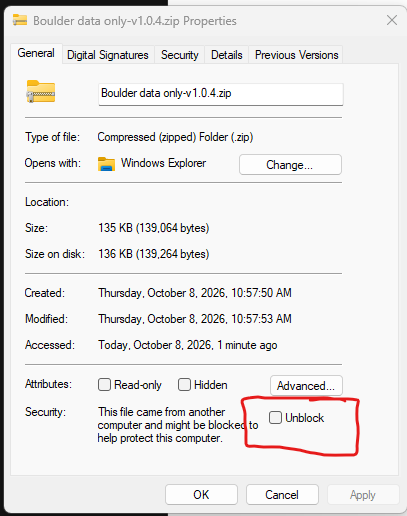
Unblock and unzip. Right-click the .zip you downloaded, choose Properties, tick Unblock at the bottom (picture right), then OK. (No Unblock box? It isn’t blocked.) Then unzip it somewhere it can stay, like D:\, not inside the WoW folder. You get a Boulder-Harvester folder.
Close WoW all the way, then double-click install.cmd. It asks where Boulder-Harvester should live, where your WoW: Forever folder is (the one with underscores in its name), whether to send redacted combat logs (No is the default, see Your Data), whether to download database updates (Yes is the default), and whether to start with Windows.
Start WoW and log in. Boulder’s round button on the edge of your minimap means it’s working. Click it for the options, or type /boulder show to see its status window.
If Windows says “Windows protected your PC”
Click More info, then Run anyway. If it says the publisher couldn’t be verified, click Run. Both only mean it came from the internet and isn’t signed by a big company.
While you play
WoW only saves addon data on a /reload or logout, so a crash loses whatever wasn’t saved. If you crash more than most, turn on the reload reminder: tick “Remind me to /reload” in Boulder’s options, or type /boulder remind on. It’s off to start. With it on, Boulder asks you to /reload after an hour or 1000 new observations, whichever comes first, and only at a quiet moment, never in a fight. /boulder every <minutes> and /boulder count <number> change when it asks. New shared numbers download on their own (unless you said no to database updates) and show from your next /reload or login.
Updating
When a new version is out, Boulder’s version shows red in its status window and a note pops up once after you log in. Download the new zip, unzip it over your Boulder-Harvester folder (yes to replacing files), close WoW and double-click install.cmd again. It keeps your captures, your log and your answers.
Uninstalling
Close WoW, then double-click uninstall.cmd; it won’t run while WoW is open. It stops the Harvester, stops it starting with Windows, and removes the shortcuts, the program and the addon. Then it asks whether to delete your captures too, and that defaults to No. No registry entries, no scheduled tasks, no background services.
If something doesn’t work
Boulder isn’t in the AddOns list: WoW only finds new addons when it starts. Quit all the way out and start it again.
It’s in the list but nothing happens: make sure it’s ticked, and tick “Load out of date AddOns” too.
Double-clicking the .cmd does nothing: right-click it, Properties, tick Unblock, OK.
Anything else: send me harvester.log from the Logs folder in Boulder-Harvester. It says what happened in plain English.
Get in touch
If you have a suggestion, an improvement, or a bug to report, please fill out this form and I will look into it as soon as I can. Thank you for your interest and involvement.
Asking for a deletion? Include your install ID: type /boulder show in game, and it’s the line that starts with “install”.
If something broke, paste the last few lines of harvester.log (it’s in the Logs folder inside Boulder-Harvester) into your message. It says what happened in plain English.
Chip in
I don’t want your money unless you can actually afford to help and want to. A donation won’t buy you an in, and I won’t make special exceptions for donators. This isn’t Patreon; you don’t get extras by paying me.
If you want to help and can afford it, I appreciate any funds that help pay for Google data storage, website fees, domain fees and the like. Boulder will never ask you for money in game.
I do not need your money to make this happen, but if you would like to contribute, please donate here.